
Why Processing Matters
Follow a restrained, software-neutral workflow from a clean linear master through gradients, stretching, color, stars, and a finished image.
Straight out of a smart telescope, the result can be genuinely good. Capture, live stacking, and editing in one approachable system are part of the appeal. But many images that make people ask, “How did you get that from a small telescope?” were developed beyond the automatic result.
That does not mean every image needs a complicated desktop workflow. It means there are useful levels of control:
- use the live or automatic stack when it already communicates what you want;
- use the instrument’s gallery tools for a quick, restrained finish;
- manually select and restack source frames when the automatic stack includes weak data;
- move to desktop software when you need calibration decisions, gradients, channel work, drizzle, star control, or repeatable project files.
The right workflow is the least complicated one that preserves the signal and supports the image you are trying to make.
What processing actually does
An astronomical camera records a grid of measurements, not a finished picture. Each pixel value represents charge produced when photons reached the sensor, together with noise and unwanted signals from the sky, optics, and electronics.
Original astronomical data are usually linear: twice the recorded value represents roughly twice the measured signal. A screen and human vision do not display faint linear data effectively. The nebula may be present in the measurements yet look almost black when the master first opens.
Processing turns those measurements into a useful image while preserving their relationships:
- calibration corrects repeatable sensor and optical signatures;
- registration aligns the sky across exposures;
- normalization and stacking reconcile compatible frames and combine their samples;
- background correction reduces gradients without erasing real faint structure;
- stretching remaps linear values so faint signal becomes visible;
- color and contrast work make structures readable without clipping or invented detail.
Processing is therefore not synonymous with making an image artificial. Every viewable deep-sky photograph embodies choices about alignment, combination, scaling, and display. The meaningful boundary is whether the result remains constrained by the captured data and whether major representational choices are disclosed.
What a smart telescope can do
Live stacking and manual restacking
During capture, Seestar aligns and combines accepted frames into a progressively deeper view. This is invaluable for checking framing and watching signal emerge, but the preview is already an interpretation: frame selection, alignment, stretch, color, and display scaling affect what you see.
ZWO’s Deep Sky Stack workflow lets users select qualified individual frames and stack them again.1 This is often the first improvement worth trying. Remove trails, cloud-softened stars, major focus loss, or serious background changes before reaching for more aggressive enhancement.
AI denoise and enhancement
ZWO documents AI Denoise and AI Enhance controls for saved stacked images.23 These can produce an effective quick result. Compare before and after at full scale, watch faint texture near the noise floor, and avoid black-point clipping or star reduction that leaves rings and unnatural gaps.
The official feature descriptions do not document a full Hα/O III/S II channel-extraction and recombination environment. Use software that exposes those measurements when the project requires them.
Preserve the source before processing
Keep the individual frames, the original stack or linear master, calibration data where applicable, intermediate filter masters, and a brief processing record. File management belongs inside the workflow because good processing is reversible.
I use Archive → Active → Projects → Results:
- Archive contains untouched source material.
- Active is the working collection being inspected and cleaned.
- Projects contains calibrated, registered, stacked, and processing-stage files.
- Results contains finished display versions.
The folder names are personal; the principle is universal. Never make the only copy of the data carry the history of every experiment.
Step 0: create a trustworthy linear master
Before creative development:
- Inspect and curate the subframes.
- Calibrate when the data require it.
- Register every accepted exposure to a common geometry.
- Normalize compatible frames and stack with appropriate rejection.
- Crop borders that lack full coverage.
- Plate-solve when later tools need sky coordinates.
- Correct gradients and background structure.
- Establish a defensible color baseline.
Siril’s spectrophotometric color calibration, for example, uses a plate-solved image, catalog data, and instrument or filter information.4
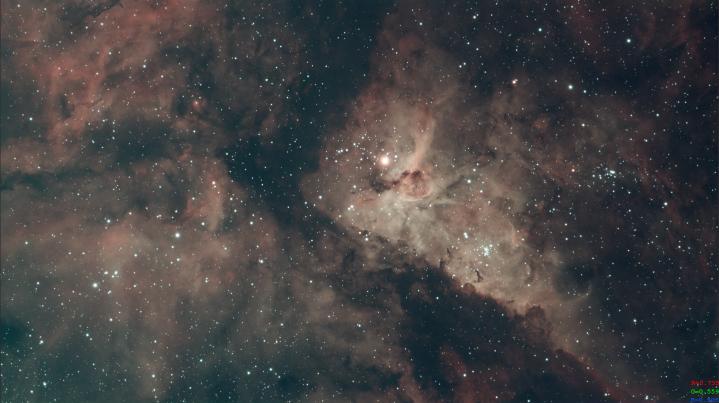
Save a clean linear master before continuing. I use a _clean suffix to mark the source-aligned, geometry-corrected, background-ready image from which different processing ideas can fork.
Level 1: control noise while the image is linear
Linear noise reduction can be effective because signal and background retain a clearer statistical relationship. The danger is mistaking faint structure for noise.
Use masks or signal-aware controls and compare repeatedly with the untouched master. A waxy background, vanished small stars, or filaments turned into smooth bands are signs that the operation is no longer merely suppressing noise.
More integration and darker skies remain the best acquisition-side ways to improve faint signal. Denoising is a finishing tool, not a time machine.
Fork stars and background when useful
Separating stars from the starless background lets each component receive appropriate treatment. Nebular structure can tolerate a stronger stretch than bright star cores; stars usually need more conservative color and sharpening.
Keep the original and inspect the starless result for halos, clipped cores, or missing small stars before a long edit magnifies them.
Level 2: stretch for structure
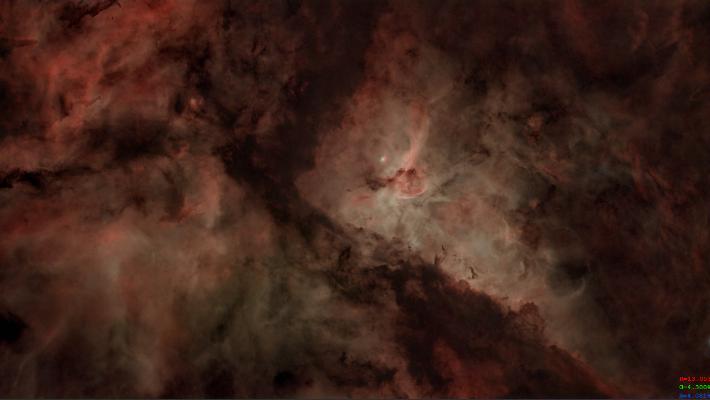
Stretch in stages. Protect bright cores and star color. Set the black point by preserving the faintest trustworthy signal the image is meant to show, not by deciding that space “should” be pure black.
Local contrast can reveal filaments and dust boundaries, but it can also exaggerate noise or create halos. The target should become easier to read without every spatial scale becoming equally intense.
Level 3: establish and grade color
Color calibration and grading are related but different. Calibration creates a defensible baseline. Grading chooses display balance, saturation, and emphasis.
For broadband data, preserve believable star color and watch for a background cast. For mapped narrowband data, state the channel mapping and let color distinguish measured structures without presenting the displayed hues as naked-eye color.
Levels 4 and 5: refine stars and recombine
If necessary, adjust the star layer separately: tame oversized stars, repair removal artifacts, preserve natural size variation, and keep enough of the star field to locate the subject in the sky.
Recombine stars and background, then inspect bright-star boundaries at full resolution and final display size. A technically perfect-looking starless background can still fail when the stars return.
Level 6: final grade
Only after recombination, review black point, white point, color balance, saturation, residual gradients, halos, and clipping. Resize and sharpen for the destination rather than the working resolution.
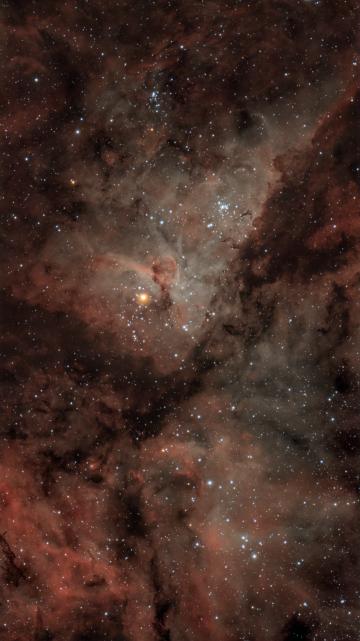
The goal is not maximum intensity. It is a coherent relationship between background, faint signal, bright structures, and stars.
Stacking and drizzle
Stacking registers frames, optionally normalizes them, combines pixel samples, and uses rejection rules to reduce values that do not belong.5 The reference frame, accepted subs, weights, normalization, and rejection thresholds all affect the result.
Drizzle reconstructs a finer sampling grid from many registered frames with sub-pixel shifts. It can help undersampled data with enough dither diversity; it cannot invent optical resolution, and it increases file size, processing burden, and visible noise per output pixel.6
Use drizzle because the sampling and data support it, not because it sounds like universal enhancement.
The disclosure boundary
My workflow jokingly calls the last level “funny photons and dinosaurs.” The joke marks a serious line. Once generative or composited elements replace recorded structure, the work has moved from measurement-constrained processing into creative image-making. Both can be valid; they should not be confused.
Notes and external sources
Footnotes
-
ZWO Seestar, Deep Sky Stack. Current manual frame-selection and alignment behavior. ↩
-
ZWO Seestar, AI Denoise. Current denoise and save workflow. ↩
-
ZWO Seestar, AI Enhance. Current gallery enhancement controls. ↩
-
Siril, Image Stacking. ↩